
Alt Tab · macOS
Alt tab for Mac.
With window previews.
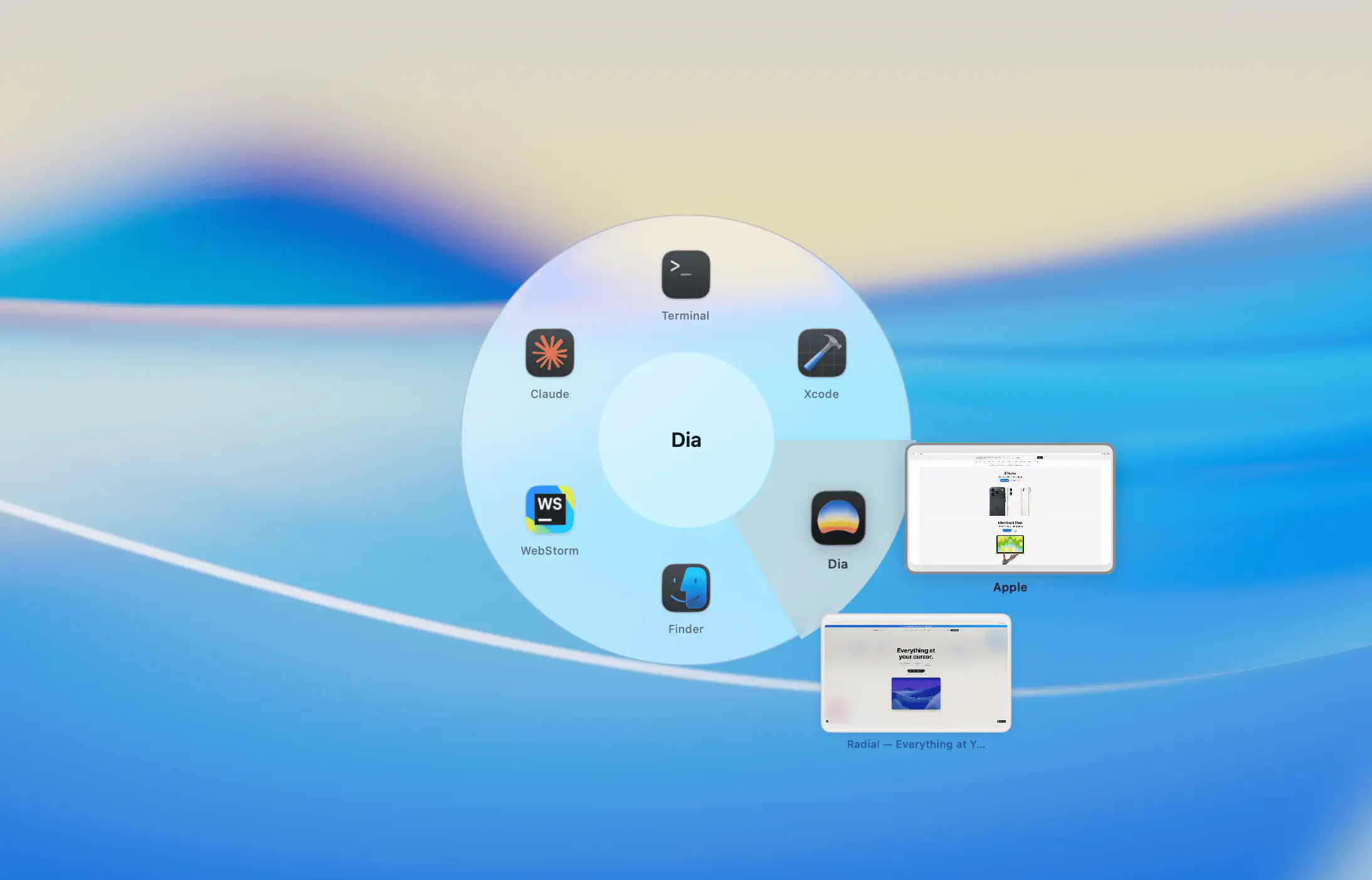
Radial is a pie menu app switcher for macOS. Your running apps appear in a circle with live window previews on hover. Switch to exactly the right window without cycling blindly through a strip of icons.
 Download for Mac
macOS 15+ · 7-day free trial · One-time purchase
The problem
macOS has no real alt tab.
Just a row of icons with no previews.
Command+Tab shows a horizontal strip of app icons and lets you cycle through them. There are no window previews. If an app has multiple windows open you have no idea which one you will land on. You switch, check, and then use Command+` to cycle through the rest until you find what you need.
Apps like AltTab and DockDoor solve this by adding window thumbnails to a linear overlay. Radial does the same thing, but as a pie menu. And it comes packed with shortcuts, app launching, automations, and a lot more on top of the app switcher. One tool instead of two.

Window previews
See what is open before you switch.
Hover over any app in the pie and live thumbnails of all its open windows appear instantly. Three browser windows, four Finder windows, two Figma files -- you can see them all and click straight to the right one.
Or just flick toward the app and release to switch to whichever window was last active. Exactly like Command+Tab, just with a lot more information available when you need it.
How it works
Familiar. Just better.
01
Press Command+Tab
The Radial app switcher opens, showing your running apps in a pie menu. Tab and Shift+Tab cycle through them just like the native switcher.
02
Hover to see windows
Pause on any app to see live previews of all its open windows. Click a window thumbnail to switch to exactly that one.
03
Release to switch
Release Command to switch to the selected app, exactly like you always have. Everything works the same way, just with more to see.
Everything you need
Built for how you actually work.
On top of window previews, Radial gives you controls that neither the native switcher nor most alt tab apps offer.
Pinned Apps
Pin your most-used apps so they always appear in the switcher, even when they are not currently running.
Always Hidden
Keep menubar utilities and background apps out of the switcher entirely, so you only see what matters.
Quit All Others
A single keyboard shortcut quits every other app at once, except for the one in focus. Great for focusing or clearing up memory.
Sort by Recent or Name
Choose whether apps are ordered by most recently used or alphabetically, whatever fits your workflow.
There is more
The app switcher is just the start.
Radial is a fully configurable pie menu for macOS. Beyond the app switcher, it lets you build context-specific menus for every app you use, with keyboard shortcuts, text snippets, folders, website bookmarks, macros, and automations. All triggered from the same hotkey, right from wherever you are working.
Download Radial for the alt tab. Stay for everything else.
Ready to get started?
Save 150+ hours
every year.
A few well-built shortcuts in Radial saves most people 15 to 30 minutes a day. Try it free for 7 days and feel the difference before you spend a cent.
macOS 15+ · €19.99 one-time · No subscription